
Database Maintenance
The Database Maintenance panel provides a window into the health of your MongoDB database. Use it to review storage statistics, inspect collections, and clean up orphaned or expired records that accumulate over time.
Navigate to Admin → Database to open the panel.
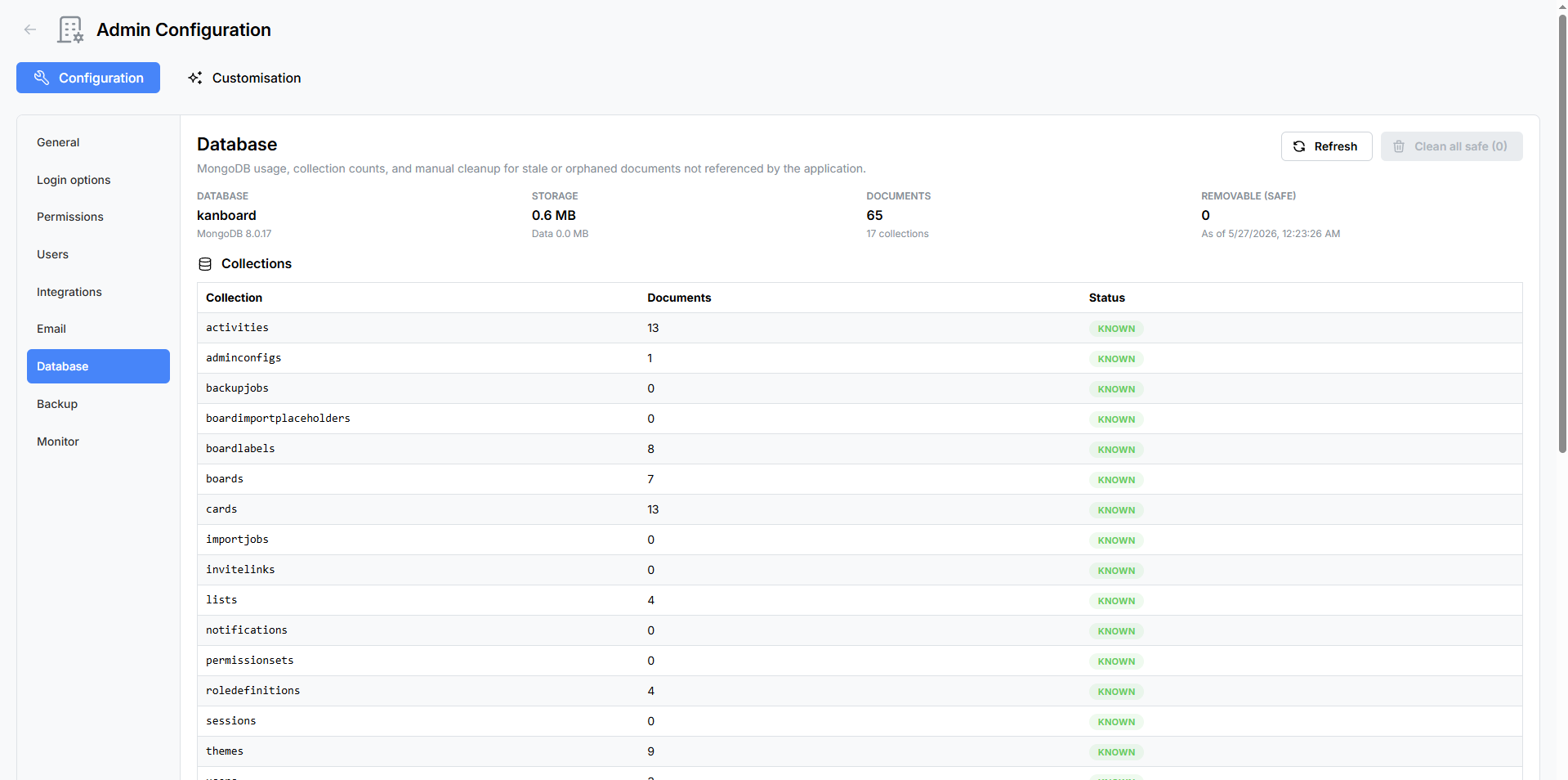
Statistics Grid
A read-only summary at the top of the panel displays key database metrics at a glance:
| Metric | Description |
|---|---|
| Database Name | The name of the active MongoDB database (typically kanboard). |
| MongoDB Version | The version of the connected MongoDB server. |
| Storage Size (MB) | Total disk space consumed by the database. |
| Total Documents | The sum of documents across all collections. |
| Collection Count | The total number of collections in the database. |
| Removable (Safe) Count | The number of documents that can be safely removed using the cleanup tools below. |
Unknown Collections
If the database contains collections that are not part of the Atlantisboard schema, they are flagged with informational badges. These may be leftover from previous versions, third-party tools, or manual database operations. Unknown collections are displayed for awareness but cannot be modified from this panel.
Collections Table
Below the statistics grid, a table lists every collection in the database:
| Column | Description |
|---|---|
| Name | The collection name. |
| Document Count | The number of documents in the collection. |
| Status | Either Known (part of the Atlantisboard schema) or Unknown (not recognised). |
Manual Cleanup
Atlantisboard provides 16 cleanup categories to help you remove stale, expired, or orphaned data. Each category targets a specific type of record and includes a Clean button that removes matching documents.

Cleanup Categories
| # | Category | What It Removes |
|---|---|---|
| 1 | Stale Import Jobs | Import job records that are no longer in progress and have exceeded their retention period. |
| 2 | Stale Backup Jobs | Backup job records that are no longer active. |
| 3 | Expired Sessions | User sessions that have passed their expiry time. |
| 4 | Expired Notifications | Notifications that have exceeded their retention period. |
| 5 | Orphan Lists | Lists whose parent board no longer exists in the database. |
| 6 | Orphan Cards (no board or no list) | Cards that reference a board or list that no longer exists. |
| 7 | Orphan Labels | Labels whose parent board no longer exists. |
| 8 | Orphan Boards | Boards whose parent workspace no longer exists. |
| 9 | Orphan Activities (no board or no card) | Activity log entries that reference a board or card that no longer exists. |
| 10 | Orphan Import Placeholders | Placeholder user records from board imports that are no longer associated with any board. |
| 11 | Orphan Invite Links | Board invite links whose parent board no longer exists. |
| 12 | Orphan Notifications (no user) | Notifications whose target user no longer exists. |
| 13 | Orphan Notifications (no board) | Notifications that reference a board that no longer exists. |
| 14 | Orphan Notifications (no card) | Notifications that reference a card that no longer exists. |
| 15 | Orphan Import Jobs (no user) | Import job records whose initiating user no longer exists. |
| 16 | Orphan Checklists | Checklist records whose parent card no longer exists. |
Each category displays a count of matching documents before you run the cleanup, so you can review the scope of the operation.
Clean All Safe
The Clean All Safe button at the bottom of the cleanup section runs every safe cleanup category in a single batch operation. This is a convenient way to perform routine maintenance without clicking each category individually.
Note: “Safe” means these operations only remove records that are already orphaned or expired — they do not touch active boards, cards, users, or any data that is still referenced by other documents. No active user data is affected.
Refresh
Click the Refresh button to reload the statistics grid, collections table, and cleanup counts. This is useful after running cleanup operations to verify the results.
Best Practices
- Run cleanup periodically — Orphaned records accumulate naturally as boards, cards, and users are deleted. A monthly cleanup keeps the database lean.
- Check before cleaning — Review the document counts for each category before clicking Clean. If a count looks unexpectedly high, investigate before proceeding.
- Back up first — For peace of mind, create a backup before running large cleanup operations.
- Monitor storage — Use the statistics grid to track storage growth over time. If storage is growing faster than expected, check for large collections or excessive activity logs.
Related Pages
- Backup & Restore — create a backup before performing database maintenance.
- System Monitor — monitor overall system health including database size.
- Environment Variables Reference — database-related configuration.